HawkSoft Integration
Written By David Brower
Last updated 8 months ago
Prerequisites:
RiskAdvisor Growth or Premium Plan
Desktop Hawksoft 6 (How to Install Hawksoft 6 Desktop)
RiskProfile with First Name, Last Name, Email or Phone Number
Admin privileges for Integration setup
HawkSoft Overview
Agencies looking for the highest return from their management system investment have come to the right place. Unlike others, the HawkSoft agency management system bundles the following capabilities with your investment;
All core features to manage, grow, and measure your agency
Live and immediate support by phone and remote login
No long-term contracts
#1 in customer satisfaction with a 97% first-call resolution rate
Every phone call is answered in less than 2 minutes, on average
#1 data conversions team
Setting up the HawkSoft Integration
How to set up the submission summary emails
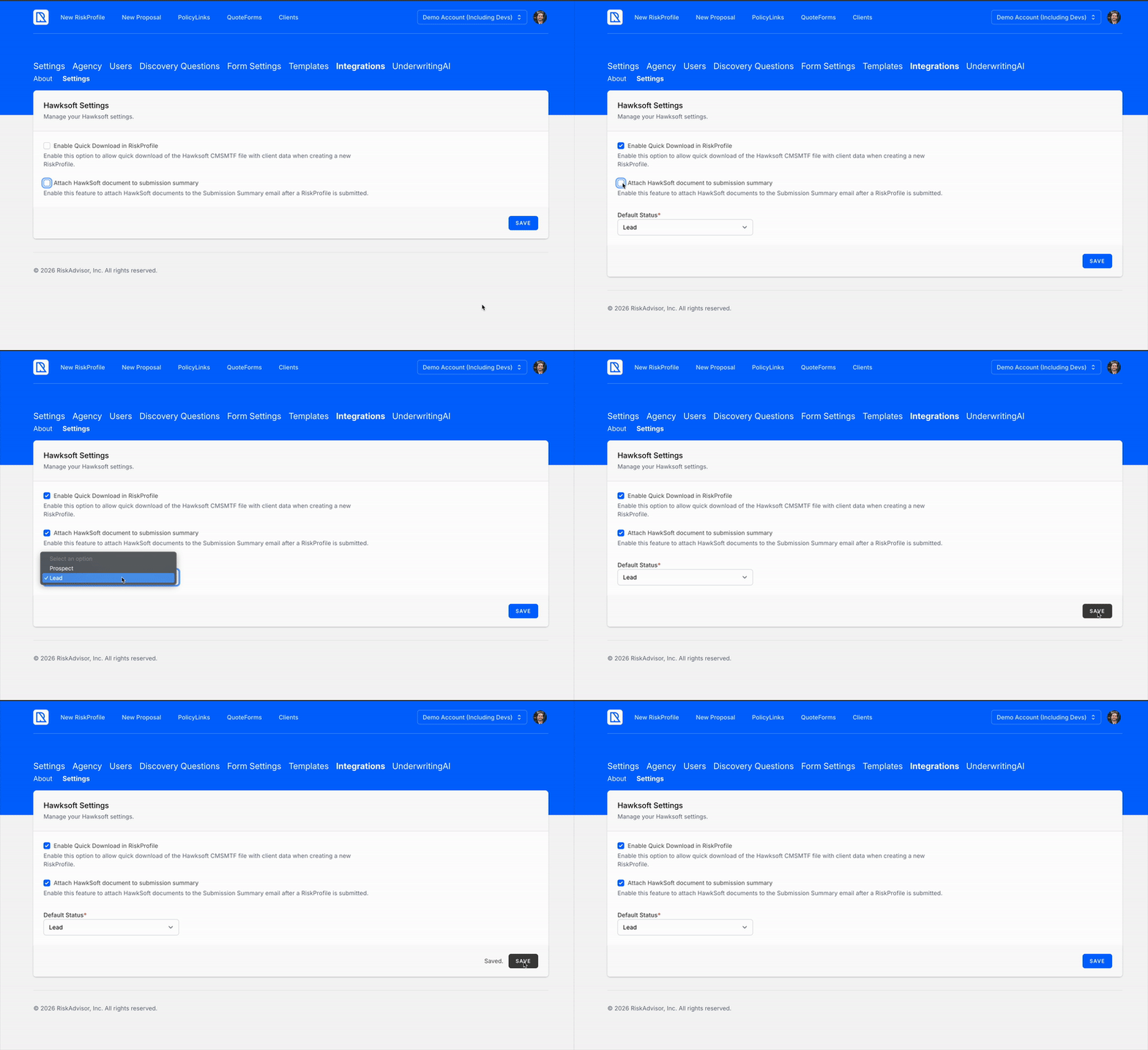
Navigate to Settings > Integrations > HawkSoft
Click “Attach Hawksoft Document to Submission Summary” checkbox
Choose if Lead or Prospect for default status
Click Save
How to setup HawkSoft Quick Download
Navigate to Settings > Integrations > HawkSoft
Click “Enable Quick Download in Risk Profile” checkbox
Choose if Lead or Prospect for default status
Click Save
Or, follow the steps in the GIF below:
Using the HawkSoft Document to import from RiskAdvisor
Once the integration has been enabled you will receive a Submission Summary email from RiskAdvisor any time a Home and/or Auto RiskProfile is completed. This email will be sent to the Return To User’s Email on the Review & Send Page.
A separate document will be received for Home & Auto.
You can also access these documents at any time though the “Quick Download” button for HawkSoft on a RiskProfile

Please follow the following steps to import your first RiskProfile into HawkSoft:
1. Receive a Submission Summary email with attachments
This attachment will be what’s known as a HawkSoft Document with an extension of .CMSMTF
It is safe to open this attachment.
You will receive one for Home and one for Auto if both are selected in your RiskProfile

Alternatively, you can download the documents using the “Quick Download” button described above.
2. Open the HawkSoft Document with HawkSoft Desktop
For HawkSoft Desktop users this should automatically open HawkSoft for you. Best practice is to not right click and open this as it will make the process more difficult.
You can also click and drag one document at a time into your HawkSoft instance
3. Review Client Information and Finish the Import Screen
A new modal should appear called “Insert Policy”, shown below.

Review your client data, add additional information, and hit “Finish” to continue
4. Repeat the process for each HawkSoft Document
If you have separate Home and Auto documents, you will select existing customer instead of new so that it will ensure no duplicates are created
That’s it! It’s that easy 🎉
FAQs 💬
Why are my files not downloading in Chrome?
Why are my files not downloading in Chrome?
Most of the time, Chrome is blocking them for safety.
Chrome may stop multiple downloads from the same website because it thinks it could be unsafe.
How do I allow multiple downloads in Chrome?
How do I allow multiple downloads in Chrome?
Click here: chrome://settings/content/automaticDownloads
Check this box: “Sites can ask to automatically download multiple files”
The next time you are prompted to download multiple documents, click “Allow” and you should be good to go moving forward.
How to Install Hawksoft 6 Desktop
How to Install Hawksoft 6 Desktop
Click the Setup Menu

Select Install Desktop App
Save Install to your workstation
Your browser may ask you where to save the file. If you are unsure where to save the file, save it to your desktop for easy access.Run the downloaded file by double-clicking on it
Login to HawkSoft as you normally do
Click “Create Shortcut on Desktop”
Click “Launch HawkSoft when Finished”
Integration Fields Currently Supported
Home 🏠
Home Fields
Home Fields
Auto 🚗
Auto Fields
Auto Fields
Still need help? Ask the team