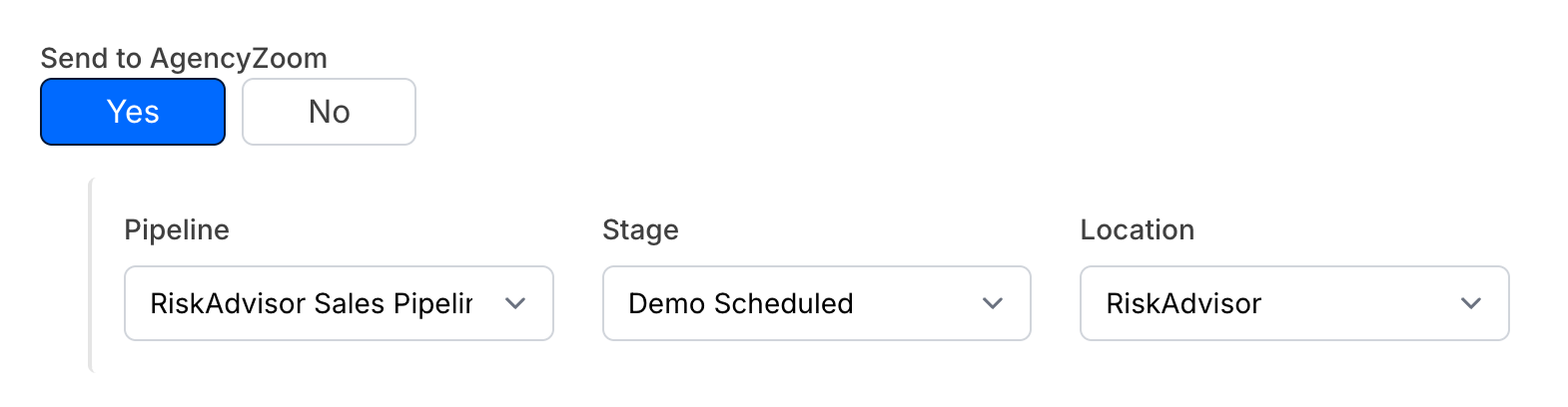
On the Review & Send Page for RiskProfiles: Once you’ve selected “yes” to send your RiskProfile to AgencyZoom, you’ll notice a new UI for handling where that RiskProfile will land. Now you can make sure it’s exactly where you expect it to go.
Pipeline, Stage, and Location settings on the Review & Send Page for RiskProfiles
Note: Your drop-downs for Pipeline, Stage, and Location will automatically default to your agency’s default settings.
Bug Fixes & Minor Improvements 🐞
Increased accuracy for UnderwritingAI home document extractions
Referral fields have been added to Call-in QuoteForms
Fixed a bug for home improvement defaulting to “Yes”
+ other minor fixes!
Facebook User Group 🖥️
Join our Facebook User Group so that we can collaborate and help each other: RiskAdvisor User Group
What should we do next? 🚀
We know how important it is to build what you need so we are asking for you to actively vote for what you'd like to see us build next for RiskAdvisor! We are getting close to being able to focus on exactly what you vote on. And guess what? You can upvote current requests or add new requests without even having to create an account! Here are some items you can vote for or you can see everything up for vote here: RiskAdvisor Feedback
As always, if you have questions for us, please chat with our support team or visit 📖 Help
As part of our continuous improvement philosophy, we’ve added some options to the QuoteForms Settings for pipelines in AgencyZoom. You can choose to use the team’s default settings or pick your own for each QuoteForm
AgencyZoom Settings for QuoteForms
Per-user Location Defaults for AgencyZoom
Some Agencies have multiple locations but only one instance of RiskAdvisor. Now you can select the proper location for your AgencyZoom integration on a per-user basis.
To check it out: Go to Settings → Integrations → AgencyZoom → Users Mapping and choose from the dropdown. You’ll see the team’s default location if no option is selected.
Added the following fields to UnderwritingAI Rules:
Property Type
Vacancy Duration
Home on Market
Distance to Tidal Water
Dog Bite history and Number of dogs
Prior Losses
Protection Class field type
Wind/Hail rules
Improved handling for more document types
Added more options for large underwriting documents to handle those stuck in processing
We are officially on version 1.0 (Beta)! Thank you for your feedback and support. If you have more requests, please submit them here: RiskAdvisor Feedback
Bug Fixes & Minor Improvements 🪲
Fixed an issue with integrations triggering validation errors for Call-in Quotes: EZlynx Option Required
We’ve improved our chat feature and help articles to make sure it’s as easy as possible to find helpful information
Added a setting to override validation errors to prevent agents from entering in dummy data.
AgencyZoom file uploads have been restored
Surveys have been added to RiskAdvisor, you might see them pop up soon!
Join our Facebook User Group so that we can collaborate and help each other: RiskAdvisor User Group
What should we do next? 🚀
We know how important it is to build what you need so we are asking for you to actively vote for what you'd like to see us build next for RiskAdvisor! We are getting close to being able to focus on exactly what you vote on. And guess what? You can upvote current requests or add new requests without even having to create an account! Here are some items you can vote for or you can see everything up for vote here: RiskAdvisor Feedback
As always, if you have questions for us, please chat with our support team or visit 📖 Help
🦃 Happy Thanksgiving to all those who celebrate. As the weather gets colder check out these pretty cool features from our November Round Up! ☃️
UnderwritingAI 🧠
New Models - UnderwritingAI has gotten faster and smarter! We’ve seen an increase in the accuracy and speed of underwriting rules we can pull from your underwriting guidelines
New Rule Types Available:
Residence Type
Dog-related fields
County
You can opt in to UnderwritingAI in Settings → UnderwritingAI
We’ve added the option for an agency to decide if the required information can be bypassed by their users. Enabling Validation Override allows the agent to move forward even when certain fields are missing or invalid.
Validation Override in Agency Settings
To enable Validation Override, Admins can visit the Settings → Agency → Validation Override → Check to allow and save
QuoteForms Updates 📝
We’ve heard you loud and clear - more customizations to your QuoteForms are now available!
Custom Logos
Custom Logos are available on a per-QuoteForm Basis. You can choose a file to upload on the QuoteForm Settings to apply a specific logo to that QuoteForm.
Upload option for Custom Logo in QuoteForm Settings
AgencyZoom Options per-QuoteForm
In the spirit of QuoteForm Customization, we know that you don’t always want the same result from submissions. Now you can control integrations independently on the QuoteForm Settings.
Toggle for AgencyZoom Integration on QuoteForm Settings
EZLynx Integration Settings per-QuoteForm
Just like with AgencyZoom, you can dictate if you want each submission to automatically move to EZLynx or stay within RiskAdvisor for your workflow. You can access these options in your QuoteForm Settings
EZlynx Settings on QuoteForm Settings
State Restrictions
If your agency only writes in a select state(s) and want to make sure customers don’t waste time filling out ineligible forms, you can enable state restrictions on certain QuoteForms. Enabling state restrictions allows you to control the submissions coming into the agency and make sure the leads are pre-vetted on location
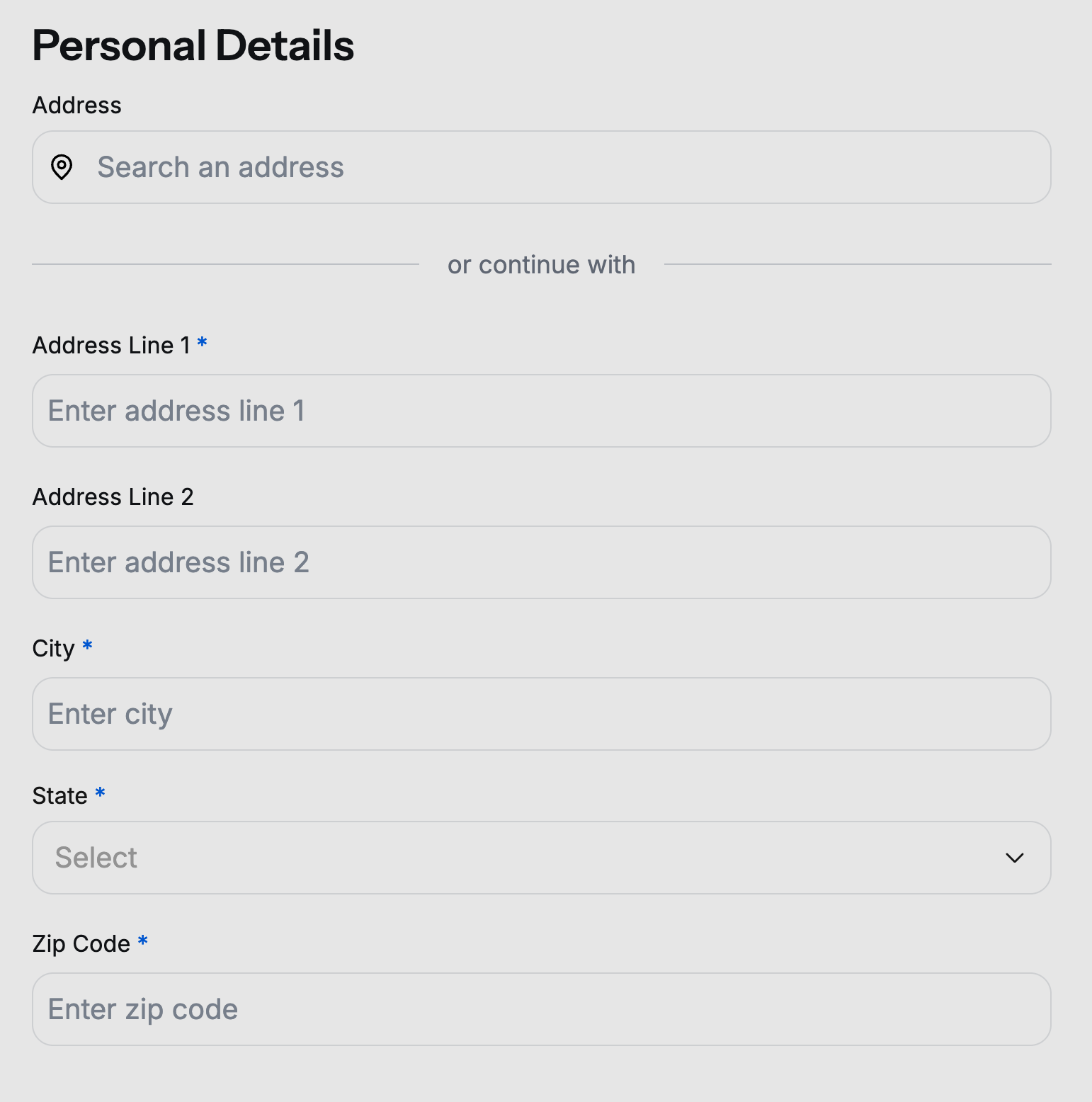
RiskAdvisor QuoteForms now have an improved UI/UX for Address. Clients can choose to search and prefill the address using the top box or manually enter their address details below.
QuoteForms Address Page
Bug Fixes & Minor Improvements 🐞
We’ve updated our chat service for better response times and improving user suggestion tracking
Added Social Security Number (SSN) to the client information on RiskProfiles
We know how important it is to build what you need so we are asking for you to actively vote for what you'd like to see us build next for RiskAdvisor! We are getting close to being able to focus on exactly what you vote on. And guess what? You can upvote current requests or add new requests without even having to create an account! Here are some items you can vote for or you can see everything up for vote here: RiskAdvisor Feedback
As always, if you have questions for us, please chat with our support team or visit 📖 Help